Find a bill and see where it stands
On this page
The Bills page lists every bill and resolution introduced in the current Congress, newest action first. You can narrow it to the ones that have passed a chamber, reached the President or become law, search it by topic or words, and open any bill for its full story.
#Find a bill
There are four ways in, depending on what you know:
- You know the number. Type it in the Politics search box, for example
H.R. 1orS 5441. You go straight to the bill. See Search Politics. - You know the topic or some words from the title. Search on the Bills page, below.
- You want to see what is moving. Use the status pills, below. The overview also has Bills on the move and New laws cards.
- You want a particular member's bills. Open the member's page and select All beside Bills sponsored, which appears once the member has sponsored more than ten. The Bills page then shows only their bills, and Show every sponsor clears the filter.
#Use the Bills page
-
Open Bills in the row of Politics sections.
-
Select a status pill to narrow the list, or leave it on Latest action to see everything.
-
To search, type words in the box, choose a type, a policy area or an order if you want to, and select Search.
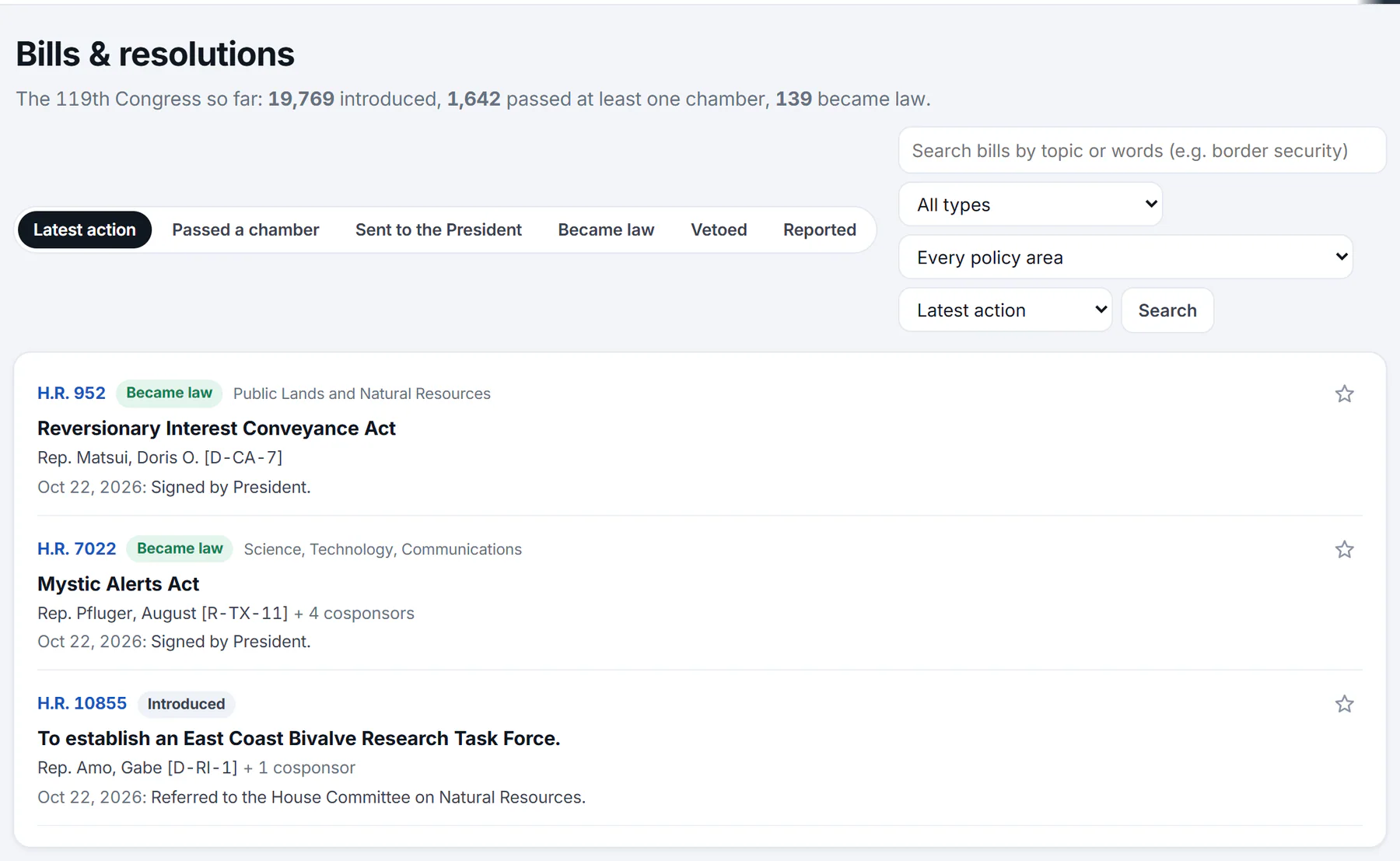
The Bills page. The line at the top totals the Congress so far; each row shows a bill's number, status, sponsor and latest action.
- 1Totals for this Congress
- 2Filter by how far the bill has got
- 3Search by topic, words or a bill number
- 4Narrow to a policy area
- 5Where the bill stands
- 6Star: follow this bill
-
Select a bill's number or title to open its page, or its star to follow it.
#What the status pills show
| Pill | The bills it shows |
|---|---|
| Latest action | Every bill, the one acted on most recently first. This is the starting view. |
| Passed a chamber | Bills that have passed the House or the Senate, including bills that went on to become law. |
| Sent to the President | Bills both chambers have passed and that have been presented to the President. |
| Became law | Bills that are now law, each with its Public Law number. |
| Vetoed | Bills the President vetoed. |
| Reported | Bills a committee has reported to the full chamber. |
The first line of the page counts the Congress so far: how many bills were introduced, how many passed at least one chamber and how many became law.
#Search, type, policy area and order
- The search box matches the bill's title, its summary, its subjects and its policy area. Every word you type must appear, and the last word can be the beginning of a longer one if it has four or more letters. With words entered, the best matches come first.
- Type limits the list to Bills and joint resolutions, or to one kind: H.R., S., H.J.Res., S.J.Res., H.Con.Res., S.Con.Res., H.Res. or S.Res. The bill page explains the kinds.
- Every policy area is a menu of broad subject categories taken from the Library of Congress's records, such as Health or Taxation, each with the number of bills in it.
- Order switches between Latest action, Newest introduced and Most cosponsors.
#What each row shows
Each row gives the bill's number, a status label such as Became law, Passed the House or Introduced, the policy area, the title, the sponsor with the number of cosponsors, and the date and text of the latest action. A bill that became law also shows its Public Law number, for example P.L. 119-37. Use Older and Newer at the bottom to move through the list, 25 bills at a time.
#Common questions
How do I find a bill by its number?
Type the number in the Politics search box, such as H.R. 1 or S. 146. You land on the bill's page. The number is not unique across Congresses, so Politics looks in the current one.
Why does a bill show Introduced when it has been sent to a committee?
The status changes only at certain steps. A bill stays Introduced while it waits in committee. It becomes Reported by committee when the committee sends it to the full chamber, then Passed the House or Passed the Senate when a chamber votes. The bill's Actions list shows when it was referred to a committee.
Why do some bills have a policy area and others do not?
Policy areas come from the Library of Congress's records, and not every bill has one.
Does Politics have bills from earlier Congresses?
No. The Bills page covers the current Congress, the 119th. A bill number from an earlier Congress has no page here.
How do I see bills on a subject?
Pick a policy area, or search a word. A bill's page also lists subject tags, and selecting one searches the Bills page for it.