Read the President's executive orders and other actions
On this page
The Executive Actions page lists the documents the President has signed and the Federal Register has published: executive orders, proclamations, memoranda, determinations and notices. Each is dated, linked to its official text and shown newest first.
#Use the Executive Actions page
-
Open Executive Actions in the row of Politics sections.
-
To narrow the list, select a kind: All, Executive orders, Proclamations, Memoranda, Determinations or Notices.
-
To look for a subject, type a word, for example
tariffs, and select Search.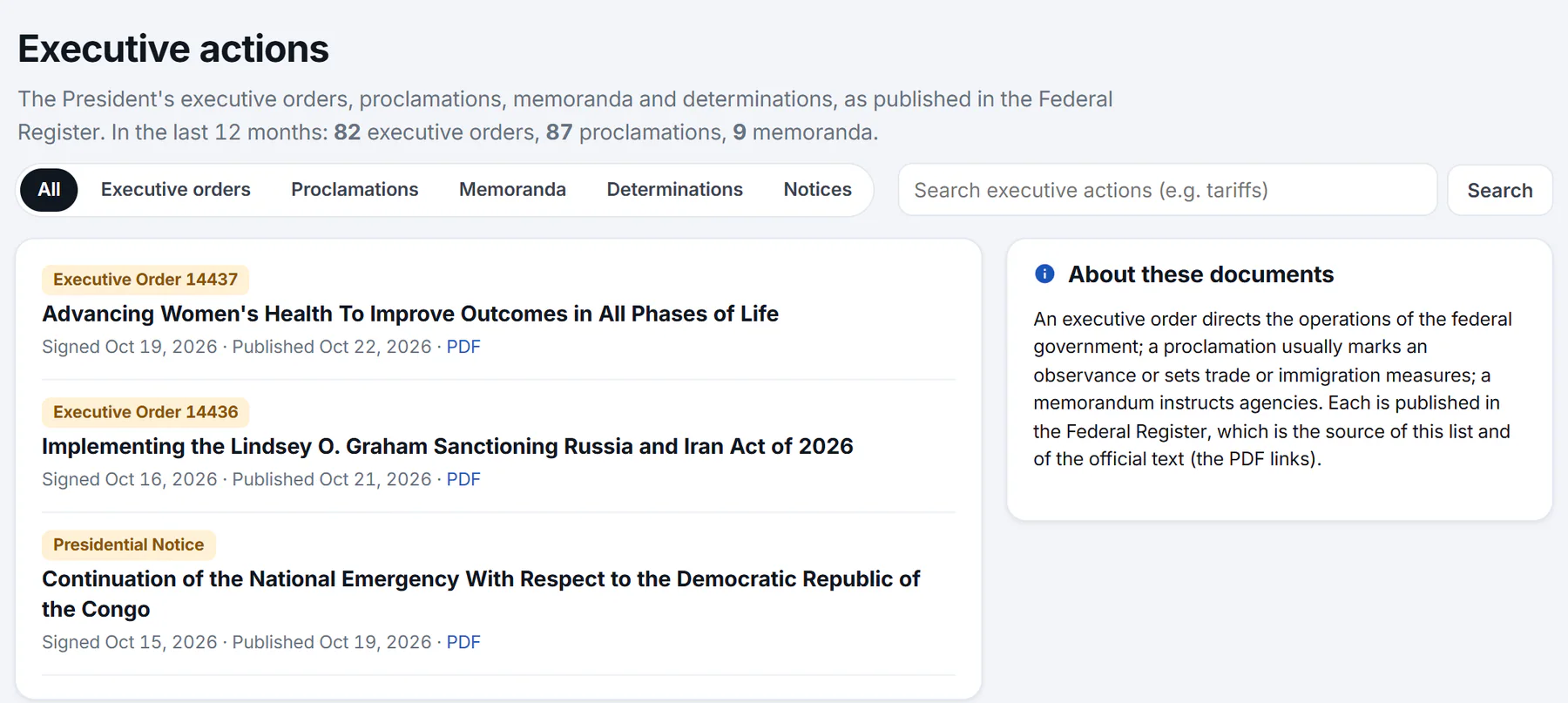
The Executive actions page: counts for the last 12 months, the kinds, a search box, and the newest documents with their dates and a link to the PDF.
- 1How many of each kind in the last 12 months
- 2Choose a kind of document
- 3Search the documents
- 4The kind of document, and its number
- 5The title: opens the Federal Register
- 6When it was signed and published, and the PDF
-
Select a document's title to read it in the Federal Register, or PDF to open the PDF.
The first line of the page counts the executive orders, proclamations and memoranda from the last 12 months. The title of each document opens its page in the Federal Register, in a new tab.
#What each row shows
- The kind of document. An executive order shows its number, for example Executive Order 14437. The others are labeled Proclamation, Memorandum, Presidential Determination or Presidential Notice.
- The title as the Federal Register prints it.
- The dates. Signed is the day the President signed it, and Published is the day it appeared in the Federal Register. A document is listed once it is published, which is often a few days after it is signed.
- PDF, a link to the official printed version.
Use Older at the bottom to go further back, 25 documents at a time. In the side column, Executive orders in the news lists recent headlines about executive orders, and About these documents explains the kinds.
#The kinds of document
| Kind | What it usually is |
|---|---|
| Executive order | A directive to the federal government about how it operates. |
| Proclamation | Usually marks an observance, or sets trade or immigration measures. |
| Memorandum | An instruction to agencies. |
| Determination | A formal finding or decision the President makes, such as a decision on refugee admissions for a fiscal year. |
| Notice | A presidential announcement, such as the continuation of a national emergency. |
#Common questions
What is the difference between an executive order and a proclamation?
An executive order directs the operations of the federal government. A proclamation usually marks an observance or sets trade or immigration measures. Both are published in the Federal Register, which is the source of this list and of the official text.
Why is the published date later than the signed date?
A document reaches the Federal Register after it is signed, and it is printed there on a later day. Politics lists it once it is published.
Why is an order I heard about not listed?
It may not be published yet. Politics copies the Federal Register on a schedule, so a document can take some hours to appear after publication. See Where the information comes from.
Does the page list every White House announcement?
No. It lists the documents published in the Federal Register. White House statements, fact sheets and speeches are not documents of that kind and are not here.
How do I read the full text?
Select the document's title to open its Federal Register page, or PDF to open the printed version. Those are the official texts.